
NetSuite in 2026 feels familiar, and that’s the point.
With two releases a year, steady UX and security updates, smarter planning tools, more pressure on integrations to stay modern. The question isn’t “what’s the newest feature.” The real question is:
Does your NetSuite feel like it belongs to your business, or does your business feel like it’s adjusting itself around NetSuite?
What “Yours” looks like in a real NetSuite account
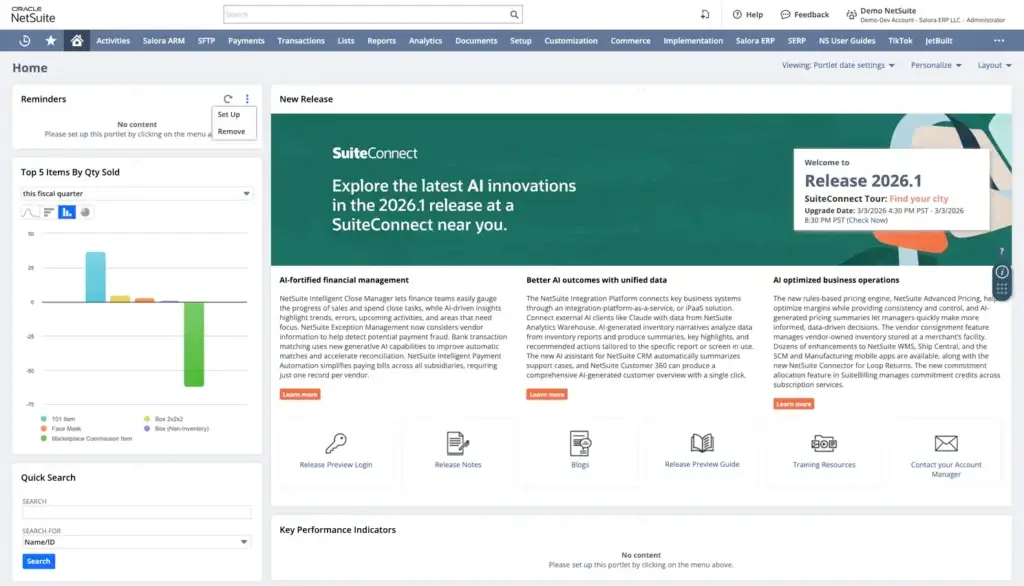
When NetSuite is set up well, teams stop “using NetSuite” and start running the business through it. You’ll notice a few things right away:
1) People don’t hunt for answers They open a dashboard. The right KPIs are there. The saved searches are obvious. The filters make sense. They don’t need a tribal-knowledge guide or a favorite coworker on speed dial.
2) Workflows match how you actually operate Approvals route to the right people. Exceptions get flagged. Handoffs are clear. Your process doesn’t depend on a single power user remembering the steps.
3) Reporting stops being a Weekly Argument You don’t need ten exports and a pivot table séance to figure out what happened last month. Finance can answer questions with confidence, quickly.
4) Admin changes don’t feel like a High Stakes Mission Roles are clean. Custom fields are documented. Integrations are monitored. Release testing is routine.
That’s the goal. Now let’s talk about the foundations that still decide whether you get there.
Shake that Rust off – Basics
If you’re new to NetSuite, or you’ve been using it for years but still feel like it’s “a lot,” this is the mental model that helps.
Records| NetSuite is a big system of records.
They are the foundation. Transactions come and go, but your records (customers, vendors, items, employees, locations, subsidiaries) are what everything is built on. If records are messy, every downstream report, approval, fulfillment, and integration inherits that mess.
>> Master data discipline (what keeps NetSuite clean over time)
- Define who “owns” each record type. Example: Finance owns vendors, Sales Ops owns customers, Ops owns items. If ownership is unclear, duplicates and bad data spread fast.
- Standardize naming conventions. Decide how you format names (Inc vs LLC, location naming, item naming). Consistency makes searching and reporting sane.
- Use required fields with purpose. Make fields required only when they protect downstream accuracy (subsidiary, currency, tax setup, payment terms, item type, etc.).
- Prevent duplicates actively. Duplicates are expensive. Put guardrails in place: naming rules, “search before create” habit, and duplicate detection where available.
- Keep inactive records instead of deleting. Inactivate customers, vendors, items that shouldn’t be used anymore. Deleting breaks history and creates audit problems.
- Control record edits after go-live. Changes to item definitions, tax codes, subsidiaries, and accounting mappings should go through a lightweight change process. “Quick edit” becomes “month-end surprise.”
>> Customer record best practices
- Segment customers intentionally. Use categories, status fields, and customer types in a way that supports reporting (and doesn’t become a dumping ground).
- Normalize addresses and contacts. Clean address habits improve tax/shipping accuracy and reduce returns and invoice disputes.
- Control credit terms and limits. Don’t let payment terms become free-text creativity.
>> Vendor record best practices
- Standardize vendor naming and legal entity details. This reduces duplicate vendors and improves payment accuracy.
- Control bank and payment info changes. Vendor payment changes should have approvals and a documented process.
- Use vendor categories. Helps with spend reporting and approval routing.
Where to find it: Lists > Relationships > Vendors
>> Item record best practices
- Be disciplined about item types. Inventory item vs non-inventory vs service matters for inventory valuation, COGS timing, and reporting.
- Get accounting mappings right. Income, COGS, asset accounts should be set intentionally, not inherited randomly.
- Standardize units of measure and naming. Avoid “same item, different spelling” inventory drift.
- Avoid “misc item” overuse. Generic items create generic reporting.
Where to find it: Lists > Accounting > Items
>> Employee record best practices
- Keep roles clean and minimal per user. Too many roles per employee creates access confusion and increases risk.
- Use departments/classes consistently. Employee classification affects approvals, reporting, and in some cases expense and time workflows.
- Be intentional with inactive employees. Inactivate instead of deleting to preserve history.
Where to find it: Lists > Employees > Employees
>> Location record best practices
- Treat locations like operational truth. Location setup impacts inventory, fulfillment, and reporting. Don’t create locations casually.
- Standardize location naming. Include region, warehouse code, or store number in a consistent format.
- Control bin setup and warehouse rules. If you use bins, location discipline becomes non-negotiable.
Where to find it: Setup > Company > Locations
>> Subsidiary record best practices (OneWorld)
- Lock down subsidiary structure early. Subsidiary design impacts consolidation, intercompany, tax, reporting, and permissions. Changing it later is painful.
- Use subsidiary-based controls intentionally. Approvals, reporting, and roles often need subsidiary-aware rules.
- Document intercompany flows. Even simple intercompany activity needs clear process ownership.
Where to find it: Setup > Company > Subsidiaries
Customers: Lists > Relationships > Customers


Vendors: Lists > Relationships > Vendors


Items: Lists > Accounting > Items


Employees: Lists > Employees > Employees


Locations: Setup > Company > Locations


Subsidiaries (OneWorld): Setup > Company > Subsidiaries
Transactions | are where NetSuite stops being “setup” and starts being the business.
Most NetSuite frustration happens here, because transactions touch approvals, inventory, accounting impact, reporting, and integrations all at once.
Core transaction hygiene
- Standardize what “done” means per transaction type. Example: a Sales Order isn’t “done” when it’s created, it’s done when it’s fulfilled, billed, and paid, depending on your process.
- Lock down who can edit what, and when. Decide what fields can change after approval or after posting. Uncontrolled edits create audit and reporting confusion.
- Use required fields intentionally. Make only the fields required that protect downstream processes (tax, location, department/class, subsidiary, payment terms). Too many required fields trains users to enter junk.
- Keep item, location, and subsidiary logic consistent. If lines can be tagged inconsistently, reporting and fulfillment logic will drift.
- Minimize “miscellaneous” line items. If you see lots of generic items (like “Service” or “Misc”), your reporting will never tell a clear story. Create a controlled catalog of items that reflect real revenue and cost categories.
- Avoid manual GL workarounds unless there’s a policy for them. Journal entries are powerful, but they can also become a dumping ground if processes upstream are unclear.
Approval controls (where most companies get burned)
- Separate entry and approval. The person creating a PO or vendor bill should not also be the default approver.
- Use thresholds and rules. Approval routing should reflect amount, subsidiary, department, vendor risk, or spend category.
- Make queues visible. If approvals live in someone’s inbox only, they’ll stall. Use reminders, searches, or dashboards that show “waiting on you.”
Inventory and fulfillment discipline (for ops-heavy teams)
- Define your “source of truth” for inventory movement. Receiving, fulfillment, transfers, adjustments should follow consistent rules and be owned by the right role.
- Enforce item and location discipline. Most inventory problems are really data-entry problems wearing an inventory costume.
- Stop negative inventory from becoming normal. If it’s allowed, make sure you know why, where, and who owns resolving it.
Reporting reliability (so finance stops rebuilding reality in Excel)
- Tag transactions consistently. Departments, classes, locations, and subsidiaries are only useful if they’re consistently applied.
- Standardize memo and reference fields. Memos are helpful, but only if they follow a pattern people can search.
- Have a small “month-end truth set.” A curated set of saved searches and reports that everyone trusts for close.
The “don’t break your own system” rules
- Avoid deleting transactions. Use void/cancel where possible and document the policy. Deletions destroy auditability and create reconciliation headaches.
- Control date changes. Backdating or changing posting periods should be restricted and logged in a process.
- Build exception handling.Define what happens when a PO was approved incorrectly, a receipt is wrong, or a fulfillment needs reversal. A documented fix path beats improvisation.Transactions are what your business does every day: sales orders, purchase orders, vendor bills, invoices, item fulfillments, item receipts, payments, journal entries.
Sales Orders: Transactions > Sales > Enter Sales Orders
Purchase Orders: Transactions > Purchases > Enter Purchase Orders
Vendor Bills: Transactions > Payables > Enter Bills
Invoices: Transactions > Sales > Create Invoices
Item Fulfillments: Transactions > Sales > Fulfill Orders
Item Receipts: Transactions > Purchases > Receive Orders
Customer Payments: Transactions > Customers > Accept Customer Payments
Vendor Payments: Transactions > Payables > Pay Bills
Journal Entries: Transactions > Financial > Make Journal Entries
Quick note: In NetSuite, transactions are technically records too. We’re separating “records” and “transactions” here purely for readability, because it’s easier to think in terms of static building blocks (customers, items, vendors) versus daily activity (sales orders, bills, payments).
Lists and accounting structure | Your chart of accounts, departments, classes, locations, and subsidiaries define how reporting gets categorized. If these are inconsistent, reporting gets messy fast.
Chart of Accounts: Lists > Accounting > Accounts
Departments: Setup > Company > Departments
Classes: Setup > Company > Classes
Locations: Setup > Company > Locations
Subsidiaries (OneWorld): Setup > Company > Subsidiaries
Statuses and workflows | are where NetSuite turns from “a database” into “a business process.”
Get this right and the system feels guided. Get it wrong and everyone starts DM’ing screenshots.
Status best practices (the day-to-day reality)
- Standardize what each status means in your org. “Pending Approval” should mean the same thing across teams, not “sometimes approved, sometimes not, depends who made it.”
- Use statuses to drive action, not just description. A status should tell someone what to do next: approve, fulfill, bill, receive, pay, close.
- Avoid custom status chaos unless you truly need it. Most confusion comes from too many custom fields and workarounds layered on top of native status behavior.
- Make exceptions visible. Don’t bury issues in a transaction note. Use saved searches and reminders to surface stuck transactions (pending approval too long, partially fulfilled too long, bills on hold, etc.).
- Teach the “three status checks.” When something feels off, users should know to check:
Workflow best practices (SuiteFlow and approvals)
- Map the process first, then build. If the business can’t explain “who approves what and why” on a whiteboard, the workflow will become a mess in production.
- Keep workflows small and modular. One massive workflow that handles everything is harder to debug than several focused workflows.
- Name everything like it will be handed to someone else. Workflows, states, transitions, and actions should be readable. Future you will thank current you.
- Version workflows deliberately. Don’t edit live workflows blindly. Use controlled changes, track versions, and document what changed and why.
- Build guardrails for approvals. Add rules that prevent self-approval where appropriate, enforce thresholds, and route based on subsidiary, department, vendor risk, or amount.
- Use SuiteFlow for orchestration, not heavy logic. If the workflow is doing complex calculations or performance-heavy checks, that’s often better handled by script or by simplifying the process design.
- Always include an “escape hatch.” Have an admin-safe way to handle edge cases: a controlled override role, a special approval queue, or a documented manual resolution path.
Testing and troubleshooting habits that save hours
- Create a workflow test script. A short checklist of scenarios: normal approval, threshold approval, rejection, re-submit, edit after approval, and cancellation.
- Monitor “stuck” states. Use saved searches to catch transactions lingering in certain statuses beyond your normal SLA.
- Document the approval chain. If users don’t know who the next approver is, they’ll blame NetSuite instead of the process.
Example path to view: Transactions > Sales > Enter Sales Orders (open a Sales Order and check Status)
Where you manage workflows (SuiteFlow): Customization > Workflow > Workflows
Where approvers usually work from (common examples):
PO approvals: Transactions > Purchases > Approve Purchase Orders
Vendor Bill approvals: Transactions > Payables > Approve Bill
Roles and permissions |Roles are the “user experience layer” of NetSuite.
If roles are messy, everything feels inconsistent: buttons disappear, fields vanish, approvals break, and two people can run the “same report” and get different answers.
Practical best practices
- Start with a role blueprint, not ad-hoc fixes. Define your core roles and what each role is allowed to do (and not do). Treat roles like a controlled asset, not a preference setting.
- Stick to least privilege. Give users only what they need to perform their job. Don’t solve urgency with Admin access.
- Separate “entry” from “approval.” The person who creates a vendor bill shouldn’t be the same person who approves it, unless you’re intentionally designing that control.
- Use role-based dashboards. Don’t make everyone “learn NetSuite.” Put the right KPIs, reminders, and searches on the dashboard for that role.
- Standardize naming. If roles are named like “AP – Bills Entry” vs “AP Role 2” you’ll save future-you a lot of pain.
- Document every non-obvious permission. If you grant something powerful (editing GL impact, managing workflows, script deployment), add a short note in your internal admin doc about why.
- Review quarterly, especially after reorganizations. People change jobs faster than roles change. Build a simple access review cadence.
- Use the right tool for “special powers.” If someone needs a one-time action, consider a temporary role assignment or a controlled process instead of permanently expanding access.
A few basic roles you should recognize (and keep clean)
Every company’s exact list varies, but most NetSuite environments end up needing some version of these:
- Administrator Full access. Keep this list very small, audited, and intentional.
- Accounting Manager / Controller Broad accounting access, approvals, close tasks, reporting, review capabilities.
- AP Clerk / AP Specialist Vendor maintenance (sometimes limited), enter bills, manage AP transactions, run AP searches.
- AP Approver Approval-only role for vendor bills, purchase orders, or payment runs (depending on your process).
- AR Specialist Create invoices, apply payments, manage customer credits, AR reporting.
- Purchasing / Buyer Create and manage purchase orders, vendor interactions, receiving coordination (without accounting power).
- Warehouse / Fulfillment Item receipts, fulfillments, bin and inventory tasks (often paired with WMS roles if enabled).
- Sales / Sales Ops Quotes/estimates, sales orders, customer visibility, pipeline-related reporting (limited financial visibility).
- Executive / Read-Only KPIs, dashboards, saved searches, reports. No transaction editing.
If you want a simple governance rule that works: fewer roles, better defined, well documented, reviewed regularly. Most teams don’t have a NetSuite problem, they have a role sprawl problem.
Users (who gets which role): Setup > Users/Roles > Manage Users
Permission details (inside a role): Setup > Users/Roles > Manage Roles (open the role, then Permissions subtab)
Reporting tools |Saved searches, reports, SuiteAnalytics workbooks.
These turn your transactions into answers. If these aren’t curated, users fall back to exports and side spreadsheets.
If dashboards are the front door, saved searches are the kitchen. People live here.
>> Best Practices
- Name them like a human. Good: “AP, Bills pending approval (last 14 days)” Bad: “VB_SS_v3_FINAL2”
- Put the “so what” in the title. If the search is meant to drive action, make it obvious.
- Standardize date logic. Decide whether “This Month” means calendar month, fiscal period, or rolling 30 days, and label it accordingly.
- Use consistent filters across departments. If Finance and Ops run “Open Orders” and get different results, it’s usually filter logic, statuses, or subsidiaries not matching.
- Avoid overly clever formulas when a field exists. Formulas are fine, but lots of heavy formulas can slow results and make troubleshooting harder.
- Design for the next click. Add columns that let users act: internal ID (hidden), record link, status, assigned approver, days open, next step fields.
>> The highest-value saved searches do one of these:
- Work queues: “Bills to approve,” “Orders to fulfill,” “Receipts overdue”
- Exception lists: “Orders stuck in pending fulfillment,” “Negative inventory items,” “Invoices past due with no follow-up”
- Close support: “Unapplied payments,” “Transactions with missing department/class,” “Posted to wrong period”
>> Permissions and sharing (don’t let searches become tribal knowledge)
- Set audience intentionally. Make the search visible to the roles that need it, and hide it from everyone else.
- Avoid personal searches for team processes. If the search supports a business process, it should be owned centrally, not created under one person’s account and forgotten.
- Create a “Certified Searches” folder. A small set of approved searches used for close, operations, and leadership dashboards.
>> Performance and maintainability
- Keep result sets reasonable. If a search returns 200,000 rows, it’s not a workflow tool anymore. Add filters, create sub-searches, or use summary/criteria smartly.
- Use summaries when possible. Summary searches often run faster and match how leaders consume data.
- Document the non-obvious ones. If a search is critical and has tricky logic, add a short description: what it’s for, who uses it, what filters matter.
>> Common “starter pack” saved searches most teams should have
- AP: Bills pending approval, bills due this week, vendor credits unapplied
- AR: Invoices past due, unapplied payments, customers over credit limit
- Ops: Orders pending fulfillment, backorders, late POs, items with low stock
- Close: Transactions missing department/class, entries in wrong period, balance sheet tie-outs
- Review and prune quarterly:
Reports (financial statements, etc.): Reports > Financial > (Balance Sheet / Income Statement / Cash Flow)
SuiteAnalytics Workbooks: Analytics > SuiteAnalytics Workbook
SuiteAnalytics Datasets: Analytics > Datasets
What’s new heading into 2026 (in the areas teams actually feel)
NetSuite updates tend to land in a few themes. Below are the ones that matter most for everyday operations and admin work.
Security and access changes that will come up on real projects
Multiple sessions per user
Recent releases introduced support for multiple concurrent sessions, along with visibility through an Active Sessions page and a limit on simultaneous sessions. For admins, this adds transparency. For users, it reduces random friction when they bounce between devices.
Where it shows up in practice:
- Fewer “I got kicked out” messages
- Clearer investigation when something looks off
Stronger password protection
NetSuite added checks designed to reduce the risk of reused or compromised passwords. This can create user-facing prompts, so it’s worth mentioning in internal release notes before the helpdesk gets surprised.
OAuth and integration hygiene
If you run integrations, the biggest outages are rarely dramatic. They tend to be expiration-related, token-related, or caused by assumptions that were true a year ago and silently stopped being true. Recent changes around OAuth notifications and token behavior are the kind of “small admin details” that save real hours later.
A good habit for 2026: a quarterly integration review that includes certificate dates, token settings, and a smoke test of your top five integration paths.
Admin UX and account visibility improvements
NetSuite has been investing in better visibility into account usage and service tiers. When performance gets weird, or an account gets close to limits, it helps to have those metrics surfaced without digging.
Duplicate detection improvements for entities also land here. That’s not exciting, but it’s one of those quality-of-life fixes that improves data hygiene over time, especially in fast-growing teams where multiple people create records.
Inventory, warehouse, planning, and allocation: improvements that affect daily work
If you’re in distribution, manufacturing, or any warehouse-heavy environment, recent updates delivered a lot of practical enhancements. The biggest theme: more control, fewer edge-case headaches.
Examples of what teams tend to care about:
- Better handling of bin workflows and bin blocking scenarios
- More flexible work assignment controls in WMS
- Planning Workbench improvements that make it easier to filter, act, and trust the output
- Allocation enhancements that improve how kits and availability are handled
These aren’t “new features you show off.” They’re upgrades that remove small pain points that show up 20 times a day.
Analytics and integrations: where 2026 projects can quietly go sideways
Two reminders for 2026 planning:
SuiteAnalytics Connect data sources
If you use SuiteAnalytics Connect for external reporting or BI, make sure you know which data source you rely on and what your migration path is. A lot of teams only discover this when a dashboard refresh fails after an upgrade.
SOAP to REST direction
NetSuite’s direction has been pushing teams toward REST and OAuth 2.0 for newer integration work. Even if you keep older SOAP integrations running, most organizations benefit from a staged roadmap so they don’t get trapped maintaining legacy patterns longer than necessary.
This is also where it’s worth checking your vendor ecosystem: tax, payments, shipping, ecommerce, middleware. If any of those are behind the curve, you want to know early.
Release readiness in 2026: the simple approach that prevents chaos
NetSuite upgrades are manageable when you treat them as routine. The easiest way to keep things calm is to test the same small set of critical scenarios every release.
A release test set that covers most businesses:
- Lead-to-Cash: sales order to invoice to payment
- Procure-to-Pay: PO to receipt to vendor bill to payment
- Approvals: purchasing, vendor bills, credit workflows
- Warehouse: receiving, picking, packing, shipping
- Integrations: tax, payments, shipping, ecommerce, middleware
- Reporting: key saved searches, workbooks, scheduled reports
- Access: role-based dashboards, permissions, SSO, tokens
Run that in Release Preview before the upgrade window. It doesn’t need to be elaborate. It needs to be consistent.
A practical take for 2026
Most NetSuite wins in 2026 come from unglamorous work:
- making roles clean,
- tightening the two core flows,
- improving reporting so people trust what they see,
- and keeping integrations healthy.
If you want help pressure-testing your setup for 2026, Salora ERP can help with release readiness, workflow cleanup, reporting modernization, and integration planning. Reach us at [email protected].
